
December 9, 2005
Online Science For The Wired Classroom: The "Disease Spread" Gizmo from Explore Learning
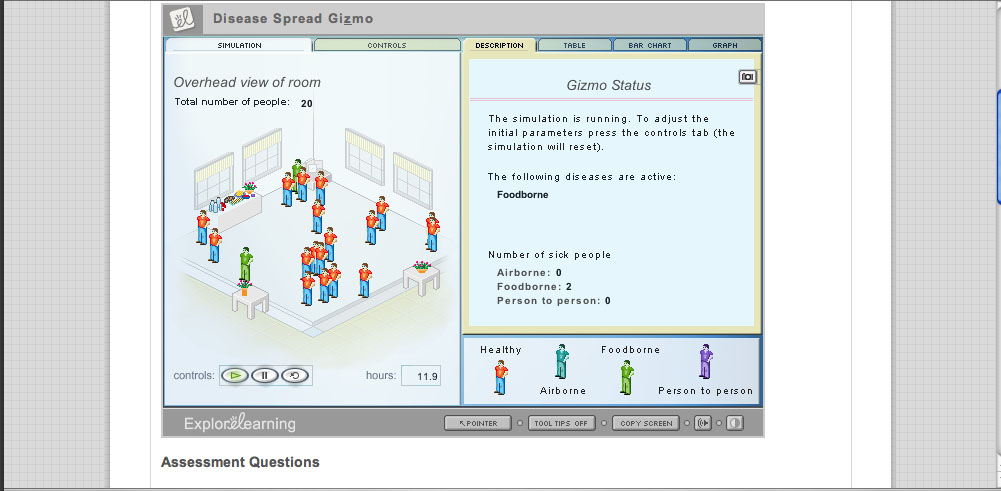
When considering the ways in which born-digital learning materials might replace conventional textbooks, it's important to think about how digital material might change the notion of what a textbook can be - for example, replacing the idea of a "one size fits all" standard classroom text with a number of smaller, atomized learning modules. The six-year-old company Explore Learning has produced over 400 such interactive modules, which they call "gizmos," for use in math and science classrooms. Each gizmo is a brief, animated Shockwave presentation, accompanied by a control panel, a series of assessment questions, and an "exploration guide" that suggests a series of experiments for students. Available through subscription, Explore Learning gizmos have won e-learning awards and recognition from the National Science Foundation, and are widely used in schools around the country.
Browsing through the gizmos (the company allows the user a 30-day free trial before asking them to purchase a subscription), I found them fairly sophisticated both in conceptualization and design. Explore Learning has managed to avoid the hypercolorful "edutainment software" approach of some K-12 digital instructional material, but they've also made their experiments visually interesting enough to capture the often variable attention of high school science students. The selection encompasses most math and science requirements for grades 6 through 12 (and early collecge): algebra, geometry, physics, data analysis, biology, chemistry, and earth and space science. There are gizmos which reveal the structure of snowflakes, teach about RNA and protein synthesis, and explore the interior surface of the Earth.
What makes gizmos pedagogically valuable is that they are not simply demonstrations of scientific principles, but experiments in which students are asked to collect data and report results. One such experiment is the "Disease Spread" gizmo, a relatively straightforward module intended for life sciences classrooms in grades 6 thought 8. "Disease Spread" teaches about airborne, food-born, and person-to-person transmission of disease. The gizmo is centered around a "simulation room" containing an adjustable number of persons and a buffet table filled with food. A s shown in the image above, red figures are healthy, while blue figures are infected with airborne disease, green with foodborne diseases, and purple with diseases obtained through person-to-person contact. Using the control panel, students select how many people are in the room, and study the patterns of disease tranmission by consulting tables and by looking at the figures in the room to see if they have changed color. The image below shows the effects of foodborne disease transmission over a brief interval of time:
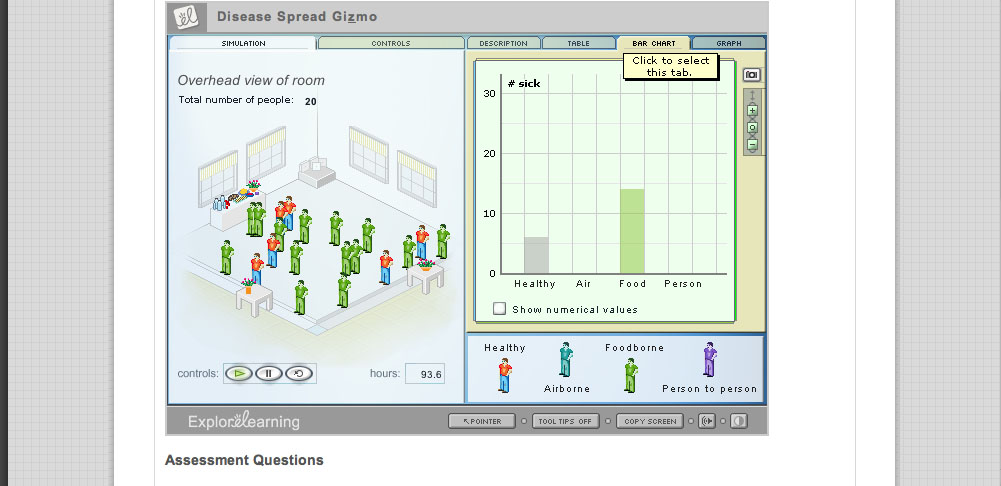
After the simulation has run through on its own, the instruction sheet linked to the gizmo asks the student to manipulate the controls on the simulation in order to answer research questions. One question focuses on whether multiple methods of contagion allow a disease to spread more quickly:
If the same disease could spread through both airborne and foodborne transmission, would it spread more quickly or more slowly than if it could only spread by one of these means? Think about your answer, and then check it by running another trial of the simulation with both Airborne and Foodborne turned on under Allowed diseases on the Controls tab. Explain how the simulation's results support your answer.
I found the "disease transmission" gizmo to be a simple and effective teaching tool; I could easily see it work in a middle school biology or health classrom. I did wonder, however, whether the gizmo, oversimplified the idea of "person to person" disease contact. The explanatory text claims that "some diseases can spread through physical contact between healthy and infected people. For example, a person infected with one of these diseases might accidentally pass on his or her pathogens to healthy people by shaking their hands or patting them on the back."
In the absence of a other information - and given the proliferation of misinformation about disease - I'm concerned that such a simplified approach might lead middle school students to believe that diseases such as HIV/AIDS could be spread through handshakes or pats on the back. This suggests, in turn, the need for teachers to insert gizmos inside a balanced curriculum that goes beyond the included exploration guides to anticipate and compensate for what the gizmos can't do. An overreliance on atomized tools like gizmos may make for a lively classroom, but it could also potentially underemphasize the "connecting the dots" or thinking deeply about an issue. Learning aids have been around for decades, but the success of Explore Learning and Brainpop suggests that teachers are increasingly relying on online aids both in and out of the classroom. It's important to consider whether this has produced a structural change in math and science pedagogy that needs to be assessed beyond thinking through whether these online modules teach the lessons they promise to teach.
Finally, it's interesting to note that over the past year, explore learning was acquired by Proquest, a leading provider of online information resources that hasn't until recently made inroads into the world of K-12. The fact that Proquest -- instead of a K-12 publishing house -- is now in charge of determining the direction of explore learning suggests that the company will continue as an archive of indexed and searchable learning materials, rather than exploring how various groups of gizmos might be woven into a multimedia math or science text.
Posted by lisa lynch at 3:53 PM
December 7, 2005
Team Up With Timo: Vocabulary Builder With Speech Synthesis
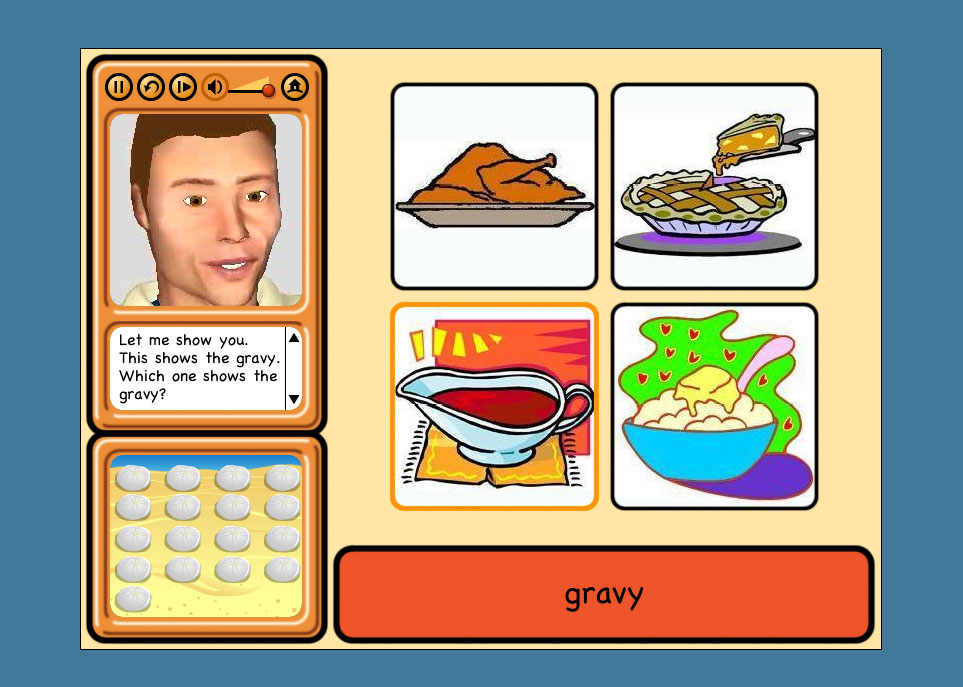
Children with speech difficulties - whether stemming from hearing impairment, autism, or language impediment - often benefit from drills in which they practice mimicking the facial muscle, jaw and tongue movements of instructors. However, as anyone who has taught or taken speech classes is well aware, such exercises are often fraught: children can become frustrated or embarassed by the face-to-face encounter such drills require.
Team Up With Timo, a collaboration between psychology professor Dom Massaro and software developer Dan Feshbach, is an interactive tutorial that allows K-4 students to closely study the mouth movements of an animated 3-D vocal coach and practice both pronounciation and reading comprehension. Timo, the software-driven language tutor, is a commercial spinoff of Baldi, a similar language tutor created more than 15 years ago in Dr. Dominic Massaro's Perceptual Science Lab at the University of California at Santa Cruz.
The software interface is very straightforward: after choosing from one of 127 vocabulary lessons, students are directed to a screen with three central elements: a central window in which the lesson takes place and two side windows containing Timo's talking head and a scoreboard. The lesson begins with Timo pronouncing the name of an object pictured in the lesson screen - in the screenshot above, a pot of gravy from a Thanksgiving meal - while the word itself appears below the set of images. The student is asked first to select the image based on a visual cue; the image they must select is highlighted). Then, they are asked to select the image according to a verbal cue from Timo; if they are hearing impaired, they will need to lip-read in order to understand what to select. After this, they must select the vocabulary word for each image based on the same verbal cue; finally, they must pronounce the word themselves following both verbal and visual cues (in the screenshot below, Timo is asking students to say the words planets, sun and moon: because this is a trial version of the program, the microphone function is turned off).

I originally assumed that Timo would contain a speech recognition program that would be able to evaluate students' pronounciations, but there isn't - which makes sense, because, to my knowledge, speech recognition software isn't sophisticated yet enough to recognize or evaluate speech impairments. Instead, Timo has a recording function, so that teachers and therapists can evaluate student's speech on their own.
The lack of internal speech evaluation is thus understandable, but it does lead to one peculiarity in the program: while students only get 'points' for correct answers in the first three stages of the tutorial, (these points indicated in the scoring window, somewhat mysteriously, by the accumulation of sand dollars on the beach) they get points every time the microphone records them trying to pronounce a word, no matter how it is pronounced. This design quirk, in turn, might lead the student to decide that their pronounciation of a word is ultimately emphasized less than their recognition of it, but several academic studies using Timo have shown that it's effective at teaching pronounciation.
Personally, I wanted Timo to show a little more soul: his facial expressions are doubtless constrained by the software's focus on modeling speech, but it seemed like it would be possible for him to be a bit happier-looking when students get the answers right -- sand dollars are well and good, but what about a smile? According to the product website, Baldi (the original version of Timo) has been used to teach austitic children the meaning of facial expressions, so it seems like more expressiveness is certainly possible.
Massaro and Feschbach are now developing a Timo authoring program, which is currently looking for beta testers: it's designed to let speech therapists and parents create their own lessons with Timo. If you're interested, contact them at pilot@animatedspeech.com.
Posted by lisa lynch at 2:49 PM
November 4, 2005
Soliloquy Reading Assistant: Turning the Computer into A Personalized Tutor
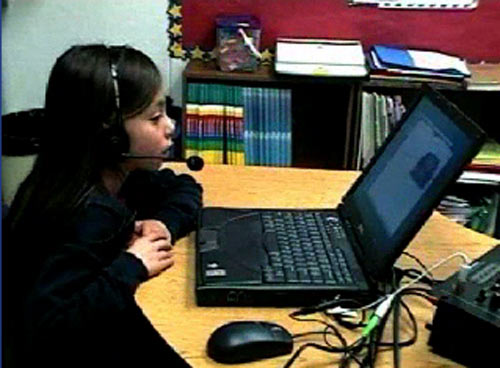
Most of the projects on nexttext highlight ways in which electronic media is changing the format of the textbook--extending and enhancing content. But digital technology also presents an opportunity to change the format of the learning experience, extending and enhancing the teacher. Our most recent profile, SAT Math Pro, used animation and audio software to capture and present a real teacher explaining a math problem. Soliloquy Reading Assistant takes it a step further, using voice recognition software which "listens" as a student reads out loud, and responds with audio-visual commentary tailored to the individual needs of that reader.
This simulated tutor extends the reach of the teacher, providing the kind of individual attention that is (according the website) scientifically proven to improve fluency. To use Soliloquy Reading Assistant, the student puts on a headset (see above), logs in and selects a book from the "library." Content is provided by leading educational publishers including: Caras, Pearson, Scott Foresman, and Charlesbridge Publishing. Once a book is selected, the student can choose to hear it read via the "Read to me" feature or she/he can simply begin reading into the microphone. Voice recognition and analysis software "listens" and when the student mispronounces a word it responds by reading the word correctly. If the student hesitates over a word, but does not mispronounce it, the word is added to the "review" list. Upon completion of the story, students can play back their voice recording and hear how they did. The "Review" feature identifies words the student has mastered as well as words that need practice. To help build vocabulary, students can take advantage of a context sensitive glossary. Students are further engaged by a system of "Power Points" awarded each time a story is completed. The more students read, the more Power Points they will rack up. A "Progress Screen" shows the results of their current reading and a log of their past readings.
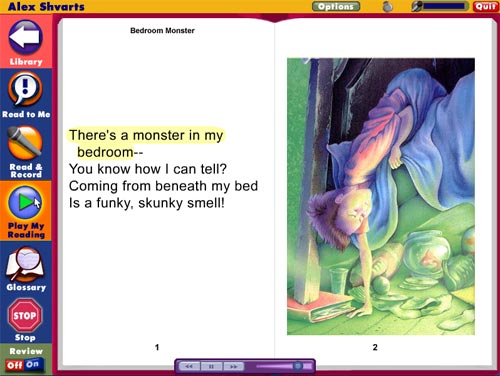
As you can see in the screen grab above, the electronic version looks very much like the print book, fully illustrated with large, easy-to-read type. Soliloquy also has additional accessibility settings to help users with low vision or motor skills.
Teachers using Soliloquy also have an array of tools at their disposal. They can quickly check on the progress of each student from their own computer, listen to the students' audio recordings and make automatic assignments.
Through two basic types of reports, they can see how much students read and at how many words per minute.
The Reading Assistant Manager's 'Usage Report' provides the following information for each student: reading time, listening time, quiz time, total usage, number of completed titles, last session date and total number of sessions - Reports and data can be exported to be included in grant proposals, larger reports, and student information systems.
The 'Fluency Report' provides teachers with: date of last session, number of completed titles, average text level, total number of readings, Words-Correct-Per-Minute for the first and last readings, as well as average Words-Correct-Per-Minute. Teachers can also create custom reports, choosing from a list of topics. Administrators only may also create reports based on student criteria such as ESL, free lunch, ethnicity, etc.
Breakthrough products like Soliloquy Reading Assistant are exciting because they allow us to start thinking about a future where simulated teachers are built into all electronic textbooks. The question to ponder is: what will the emergence of the robotic teacher mean for the future of education itself? There are some clear advantages. This technology greatly improves learning for students enrolled in large classes where they get little individual attention. I'm concerned, however, that as these technologies develop, they might be seen as acceptable replacements for real teachers.
Another drawback: a robotic tutor can't provide uniquely human forms of encouragement that are conveyed via gesture, expression and a whole array of non-verbal communications which give students positive messages about their abilities and their potential. On the flipside: a robotic tutor can't provide uniquely human forms of discouragement that are conveyed (intentionally or unintentionally) via gesture, expression and a whole array of non-verbal communications which give students negative messages about their abilities and their potential.
I'll just add one more subjective response I had to the Soliloquy demo. To make the point clear, I'll contrast it with the response I had to SAT Math Pro. Since I knew the "virtual teacher" was Colleen King, a real person and a teacher, I felt the voice was somehow embodied and the message was trustworthy. The Soliloquy tutor, by contrast, was an unknown entity, who sounded more like a voice actor than real teacher. It's a subtle thing and I don't know if it will register with kids, but the slickness of the vocal performance made it more difficult for me to engage.
But all criticism (and future speculation) aside. Soliloquy Reading Assistant is a superb example of "what happens when textbooks go digital."
Posted by kim white at 7:41 AM
September 2, 2005
The NASA SCI Files: Problem-Based Learning Introduces Students to Scientific Inquiry
The NASA SCI Files is a research and standards-based series of free integrated mathematics, science, and technology instructional distance learning programs that NASA Langley Research Center created for students in grades 3-5. The series uses Problem-Based Learning (PBL) to introduce students to scientific inquiry while providing students the opportunity to solve real world problems with the help of community experts and NASA researchers.
The program offers a series of television broadcasts that feature the tree house detectives, six children who solve "real world" problems using scientific inquiry. They are helped by their mentor Dr. D and also by NASA researchers, community experts, and students across the country who are members of the SCI Files Kids Club. The Website leads students through online investigations that can be used in tandem with the television broadcasts. Red Rover, for example, is used with "The Case of the Great Space Exploration." This problem-based activity asks students to research the requirements for crewed and uncrewed missions to Mars.
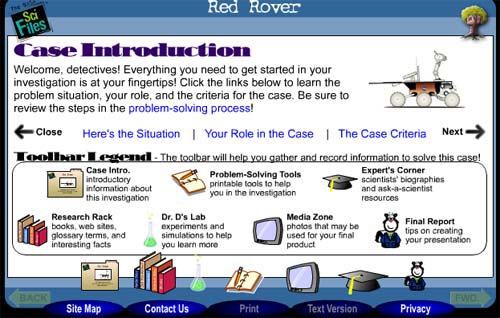
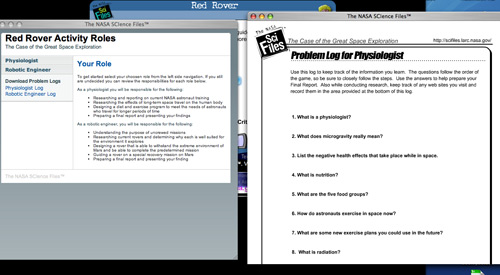
The students choose one of two roles, physiologist or robotics engineer. Each role has a list of research goals and project tasks. Once a role has been selected, the student prints out a "Program Log," with a list of ten questions such as: What is a Physiologist? What does microgravity really mean? How do astronauts exercise in space? Supplementary information, including text, diagrams, images and video, is available on the site to help students answer these challenging questions.
The nature of the supplementary information makes this resource different from a print textbook. Short videos explain long-term space travel problems such as: how food will be grown in space and how will the body be affected by zero gravity? These multi-media learning tools benefit visual and aural learners in ways that print textbooks cannot. Working through a tightly organized collection of media "clues", allows students to experience a sense of discovery while developing problem-solving skills. This dynamic would be difficult to duplicate in the static, linear-formatted print textbook. Finally, students are asked to write up a report of their findings. This journaling activity is designed to model the scientific process.
The NASA education site also provides extensive support for teachers. Educator guides (available as downloadable PDFs) list national science, math, or geography standards satisfied by each respective program. They also offer lesson-planning support including: a program overview, vocabulary, implementation strategy, activities, experiments and worksheets. Teachers can also sign up for classroom mentors, provided by the Society of Women Engineers. These mentors were specifically chosen to raise student awareness of careers in the sciences and to help students "overcome stereotyped beliefs by presenting women and minorities in challenging careers." The mentors assist educators either in person or by e-mail. Educators can find additional resources and support by contacting their local Educator Resource Center (ERC). "Personnel at ERCs located throughout the United States work with teachers to find out what they need and to share NASA's expertise. The ERCs provide educators with demonstrations of educational technologies such as NASA educational Web sites and NASA Television. ERCs provide inservice and preservice training utilizing NASA instructional products."
The depth and breadth of resources NASA has made available to students, parents, and educators makes the site more than just a digital textbook. It is a comprehensive subject-specific full-service digital learning environment. Created by top experts in the field, the space provides curriculum materials similar to those found in print textbooks, but it also vastly expands the territory of the print textbook and the process by which teachers and students explore subject matter.
Posted by kim white at 2:17 PM
August 31, 2005
Who Built America? The Expanded Textbook

The early and mid-1990s saw a brief but brilliant flowering of CD-ROM publishing that, to some degree, has never been surpassed, even as the world wide web has evolved from a simple hypertext system into a vibrant, interactive medium. In spite of unprecedented accessibility to knowledge resources, and a sprawling social dimension, the web has so far produced very little in the way of educational resources that could legitimately be said to challenge the hegemony of the printed textbook.
For this reason, it is worth looking back at the CD-ROM heyday, when an exciting array of "expanded books" and other genre-busting, interactive works were produced that made prodigious use of multimedia and tested the possibilities of the personal computer as a reading and learning device. At that time, a number of quality educational titles emerged on CD-ROM that suggested a new direction for the textbook. Who Built America?, a publication of the American Social History Project at the City University of New York, is undoubtedly one of the finest.
Based on a comprehensive, two-volume print history, the Who Built America? (WBA) CD-ROMs constitute both a revision and an expansion of the original titles. The first disc covers a period beginning with Reconstruction and running up to the beginning of World War I, while the second picks up at the outbreak of the first great war and follows to the conclusion of the second. Disc 1 (view demo) was released in 1993 by the Voyager Company to great acclaim. But it was not until 2000 that the second disc was published, this time by Worth, in a slightly altered format. Most important, the second disc was built in TK3, a commercially available ebook authoring program developed by Night Kitchen, an outgrowth of the Voyager company, and progenitor of The Institute for the Future of the Book.
The choice of TK3 highlights another key challenge for redefining the textbook in the digital age: an electronic textbook cannot be read-only. It must allow the reader to personalize the text, making annotations, highlighting passages, inserting memory aids. TK3 enables this, preserving many of the most crucial affordances of print books with tools such as highlighting, sticky notes, notepads, and even a way to dog-ear pages.
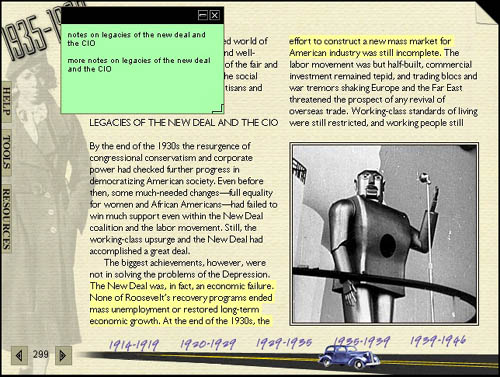
These familiar features are then augmented by the unique affordances of digital machines: rich multimedia, connectivity to the global network, and powerful search capability. This is the textbook enhanced. (more about TK3)
Retaining the basic printed textbook format, each WBA disc contains approximately 3,000 source documents - text, audio, film and links to the world wide web. In effect, the textbook expands into a nearly bottomless resource, while preserving the rigor of a bounded print text.
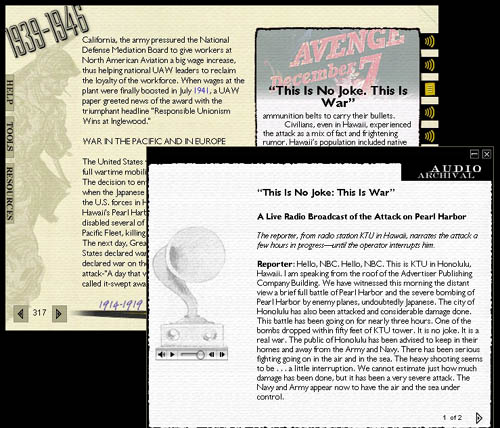
Even more significant, by placing source materials alongside the authors' exposition, a student is better able to make sense of the book as a work of scholarship, and even to challenge the authors' assumptions by drawing their own conclusions based on unvarnished, documentary evidence. The implications of this are profound, since the textbook has long been a top-down instrument of unquestionable authority.
Posted by ben vershbow at 12:17 PM
August 29, 2005
ICONS: Simulating the Game of Global Politics Online
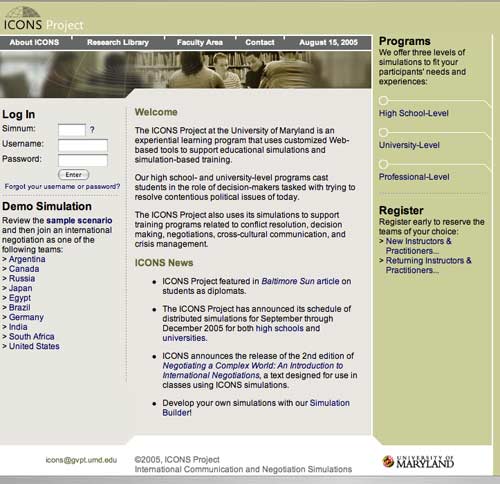
ICONS is a program developed by the University of Maryland that weds the study of global politics - for high school, university, and professional-level students - with live, simulated negotiation. Anyone who did Model U.N. in high school will find this familiar. Only with ICONS, the simulation space is online and conferences take place across the network.
Each academic year ICONS organizes distributed and single-classroom simulations for paying participants. Scenarios are timely and relevant to real-world political developments, ranging from international health crises, to environmental or financial treaties, to security and anti-terrorism issues. The idea is for an ICONS simulation to be inserted into a lesson plan or curriculum as a purpose-driven, high stakes component. A simulation is a tool that applies and activates the usual course of study by placing students into a live, contentious situation where they must solve a real-world problem and juggle a host of competing interests.
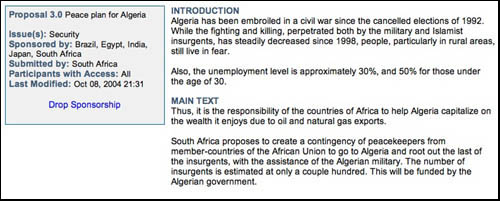
Proposal: Peace Plan for Algeria
Simulations actually take place on the ICONSnet - a secure online playspace providing communications infrastructure and workspace for conference participants. ICONSnet is entirely web-based, requiring no client software on individual students' machines. When logged on, students can send messages to fellow team members or to other teams. They can draft and vote on proposals, amend existing ones, and engage in real-time conferences with other groups. All the while, instructors can evaluate students through private progress reports from the teams and by monitoring message and conference logs.
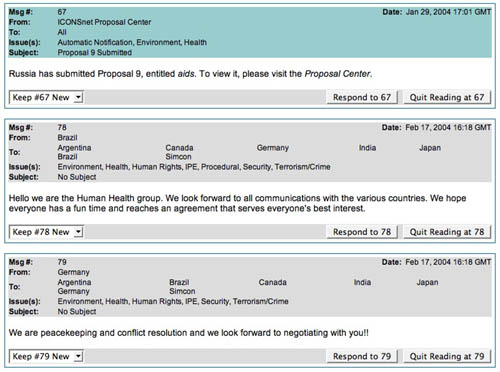
Proposal List
A typical simulation involves 15-20 teams, each representing a different country. The process can be broken up into three main stages (taken from the ICONS site):
Pre-simulation Preparation (4-6 weeks):Students work as a team to research positions using the ICONS research library and other online resources to determine a negotiating strategy for their role in the simulation.
Simulation Participation - Negotiation & Decision-Making (4-5 weeks):Students pursue their specific goals through interactions with other teams using the ICONSnet online communication system. This may include messaging, conferences and consideration of proposals.
Post-Simulation Debriefing (~2 weeks):Teachers lead students through written and verbal reviews of the exercise to reinforce learning objectives.
Teachers and developers can also design their own simulation using the Simulation Builder, but they still must pay for access to the ICONSnet. The site also features a Research Library stocked with useful resources that students can use to prepare for ICONS simulations: country and regional profiles; links to government sites, charters and treaties; link bibliographies for various issue areas; and a rich aggregation of news sources.
Strong as it is, however, the library would benefit from a thorough revision, and should probably be more customizable by users. For example, most of the news sources appear to have been last updated in 2003, but by now, most of them probably have RSS feeds. The page could easily be restructured to incorporate a feed reader that would allow individual students to organize syndicated content by region, issue area and other criteria.
Posted by ben vershbow at 9:43 PM
The Colombia Project: A Portable Mini-Language Lab
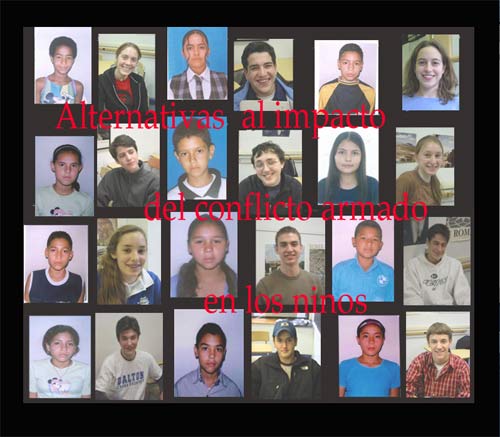


Until recently, the use of technology in language labs didn't go much further than pre-recorded audio to introduce the vernacular of native speakers, or a videotape to contextualize cultural issues. These canned, artificial products often presented generalized or stereotyped notions of life in foreign countries and rarely addressed harsh realities such as war, poverty, and internal displacement. Student interaction with these objects was equally artificial and seldom involved critical thinking or personal introspection.
Sol Gaitan, a high school teacher at the Dalton School in Manhattan, has found a way to use multiple media to create a learning environment for the foreign language classroom that goes well beyond the traditional language lab. Her mini-lab exists within a composite assignment for her Advanced Spanish IV class. According to Ms. Gaitan, "the project targets the multiple language skills involved in the process of learning a foreign language." The project, built in TK3, employs images, sound, live links, and annotated text to increase student investment and add depth and complexity to the language lab experience.
The framework for the project asks Dalton students to consider the impact of war on children in Colombia. An opening slideshow includes photographs that highlight the harsh reality of guerilla warfare in order to introduce Dalton students to the daily conditions faced by children living in these areas.
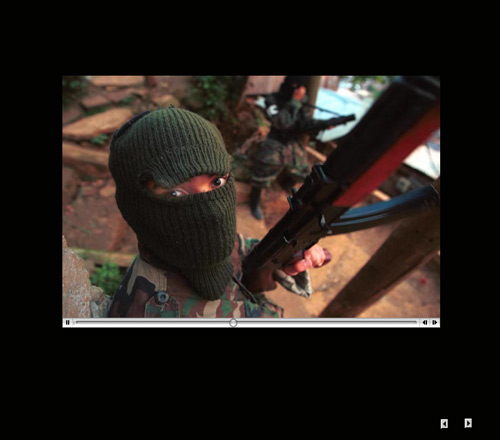
To prepare this project, Ms. Gaitan visited a school in Medellin, Colombia's second largest city. This particular school is located on the outskirts of Medellin, and is populated by people who have been displaced by war.
Ms. Gaitan asked the Colombian students to write essays about their lives. She took these handwritten documents back to New York to share with her students. The mini-biographies were scanned and incorporated into separate digital books. Each Dalton student received an essay written by a different Colombian student. They began the lab assignment by reading these short biographies, deciphering the handwritten text, and re-writing the essays in Spanish, correcting grammar and orthography.
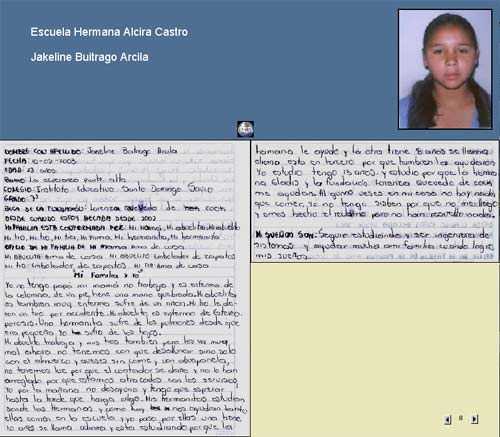
Once the essays were properly transcribed, students were assigned the task of translating them into English. Spanish and English versions were presented in parallel columns in the TK3 book, with a scrolling image of the primary source at the top of the page.

Students were then asked to think deeply about the material and to write an analytical essay addressing the impact of war and displacement on adolescents whose circumstances are different from their own. These essays were written in Spanish and added to the TK3 books. Students also produced short, improvised oral reactions to what they learned in the assignment. These oral exercises were recorded and included in their TK3 books. This year, Ms. Gaitan asked the students to produce dialogs instead of monologs. She found that dialogs, "gave the oral part a much more 'real' and impromptu character." She further improved the project by renaming it to emphasize the personal nature of the exploration:
The second time around, I called the project 'Reflexion/Reflejo. Vidas paralelas' and asked the students to see their Colombian counterparts as a mirror upon which they saw themselves, as a reflection (reflejo,) and then to write down their reflections (reflexion.) Their writing is much more personal than those of the previous year. The final pieces, complete with the dialogs, are sort of parallel lives (vidas paralelas.) Language, history and culture internalized this way, become intimate.
Instructor Sol Gaitan had this testimony about the success of the project.
Reading original manuscripts has exposed them to vernacular Spanish spoken by children their age in a way that printed text could never achieve. They have also realized how much Spanish they know, and how correct it is. They are thrilled to be authoring a little book on a topic on which they are becoming experts, thanks to the easy and direct access to the Internet provided by links created by me in the introductory material. For me, as language teacher, the icing on the cake is to have their oral commentary documented. This will allow me to assess each student's pronunciation patterns, fluency, and ability to improvise.
Posted by kim white at 11:43 AM